Customize
This page explains how to customize Wine System Prefabs. Change settings from the Unity Inspector.
Inspector labels below match the Japanese names in the Unity Editor.
Bottle settings
Select the controller object inside a bottle. The Inspector shows these fields.
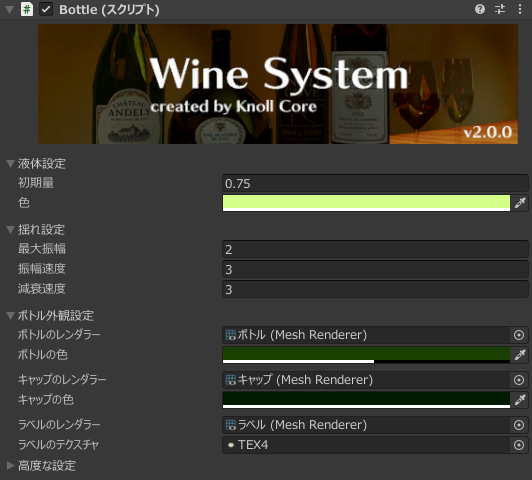
液体設定 (Liquid)
-
初期量
Initial amount of liquid in the bottle.
-
色
Color of the liquid in the bottle and of the pour particles.
揺れ設定 (Wobble)
-
最大振幅
Maximum amplitude when the liquid wobbles.
-
振幅速度
How fast the wobble oscillates.
-
減衰速度
How fast the wobble settles.
ボトル外観設定 (Bottle look)
-
ボトルのレンダラー
Renderer for the bottle.
-
ボトルの色
Bottle color.
-
キャップのレンダラー
Renderer for the cap.
-
キャップの色
Cap color.
-
ラベルのレンダラー
Renderer for the label.
-
ラベルのテクスチャ
Label texture. Use this to change the bottle label.
Glass settings
Select the controller object inside a glass. The Inspector shows these fields.
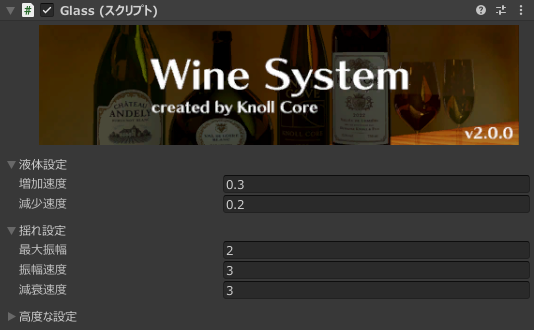
液体設定 (Liquid)
-
増加速度
How fast the liquid fills.
-
減少速度
How fast the liquid decreases when drinking.
揺れ設定 (Wobble)
-
最大振幅
Maximum amplitude when the liquid wobbles.
-
振幅速度
How fast the wobble oscillates.
-
減衰速度
How fast the wobble settles.
Advanced settings
These fields are shared by every Prefab. Change the references if you use a custom model. You usually do not need to change them.
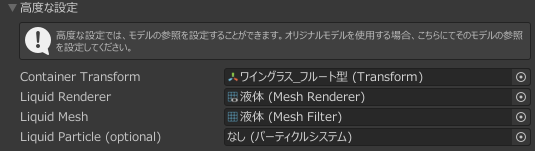
-
Container Transform
Transform of the liquid container. Change this when using a custom model.
-
Liquid Renderer
Renderer that displays the liquid. Change this when using a custom model.
-
Liquid Mesh
Mesh for the liquid. Change this when using a custom model.
-
Liquid Particle
Particle system for the liquid. Change this when using a custom model.
If something looks off after you change settings, place the Prefab again or reset the values.